Posts

Showing posts with the label ESP32-C3-DevKitM-1

Install Embedded Rust for ESP32 on Linux Mint 21.3 over VirtualBox/Windows 11 (tested with ESP32-C3-DevKitM-1)

Image
This video show steps to install Embedded Rust for ESP32 on Linux Mint 21.3 over VirtualBox/Windows 11 (tested with ESP32-C3-DevKitM-1 ). Basically I follow the steps in Rust on ESP Book > Rust Installation , with my try and error and re-try and success experience. Install Rust Install Rust using rustup script: curl --proto '=https' --tlsv1.2 -sSf https://sh.rustup.rs | sh Install espup to install tools for Espressif Install espup (requirement and espup): sudo apt-get install -y gcc build-essential curl pkg-config cargo install espup Install Toolchains for Espressif targets using espup: espup install Install additional software covered in std Development Requirements: ( https://esp-rs.github.io/book/installation/std-requirements.html ) sudo apt-get install git wget flex bison gperf python3 python3-pip python3-venv cmake ninja-build ccache libffi-dev libssl-dev dfu-util libusb-1.0-0 Install ldproxy cargo install ldproxy Setup the Environment Va...

Install Espressif IDF Extension in VS Code to program ESP32-C3 Run on Linux Mint 21.2 (over Windows 11/VirtualBox)

Image
This video show steps to install Espressif IDF Extension in VS Code to program Espressif ESP32-C3-DevKitM-1 . Here VS Code run on Linux Mint 21.2 (over Windows 11/VirtualBox) . Basically, it follow the steps in  ESP-IDF Visual Studio Code Extension Installation Guide to - Install ESP-IDF Extension to VS Code. - Install Prerequisites for Linux . - Configure ESP-IDF extension. - Add 60-openocd.rules for permisssion delegation in USB to added in /etc/udev/rules.d/. Then follow Basic use of the extension to: - Create project of Blink example. - Grant permission to user to access USB port. - finally flash on ESP32-C3-DevKitM-1. Fix IntelliSense error of: identifier "CONFIG_BLINK_PERIOD" is undefined identifier "portTICK_PERIOD_MS" is undefined in VS Code/ESP-IDF Blink Example. With auto-generated code with default setting, it can be built, flash and run on ESP32-C3 device without error. Is it OK, ...NOT. ...

BLE communication between MicroPython aioble and ArduinoBLE

Image
Previous posts introduced " MicroPython bluetooth remote control LED between Raspberry Pi Pico W and ESP32-C3, using aioble library " and " BLE examples run on Nano 33 BLE (as Peripheral) and Uno R4 WiFi (as Central) using ArduinoBLE in Arduino Framework ". This video further test how BLE communication between that two approach.

MicroPython bluetooth remote control LED between Raspberry Pi Pico W and ESP32-C3, using aioble library.

Image
Last post introduced " MicroPython bluetooth example using aioble library, temp_client.py and temp_sensor.py ". This post modified it to remote control LED via bluetooth between Raspberry Pi Pico W and ESP32-C3-DevKitM-1 , achieve the same function as in " BLE examples run on Nano 33 BLE (as Peripheral) and Uno R4 WiFi (as Central), using ArduinoBLE in Arduino framework ". Basically, the bluetooth/aioble parts on both boards are same, but code in separated is caused by different configurare of onboard LED. Code: mpy_aioble_peripheral_led_esp32c3.py """ MicroPython v1.21 exercise run on Espressif ESP32-C3-DevKitM-1 using aioble lib. Play the role as BLE Peripheral of LED. As the role in ArduinoBLE examples>Peripheral>LED - Setup as BLE Peripheral of LED, wait connection from Central device. - Turn ON/OFF onboard LED according to received command: 0 - Turn OFF LED 1 - Turn ON LED """ import sys...

MicroPython bluetooth example using aioble library, between Raspberry Pi Pico W and ESP32-C3. (Both run MicroPython 1.21.0)

Image
With recent update of MicroPython, bluetooth is supported in Raspberry Pi Pico W build. The official guide " Connecting to the Internet with Raspberry Pi Pico W book (2023-06-14) " updated with example using bluetooth. Read my previous post " Prepare MicroPython Bluetooth service example on Raspberry Pi Pico W ". Refer to MicroPython libraries document - bluetooth , higher-level aioble library is recommended. aioble provides an object-oriented, asyncio-based wrapper for MicroPython's bluetooth API. (* This module is still under development and its classes, functions, methods and constants are subject to change.) This video introduce the alternative using aioble library, run on Raspberry Pi Pico W and  Espressif ESP32-C3-DevKitM-1 , both run MicroPython v1.21.0. Notice that aioble is included in Raspberry Pi Pico W MicroPython v1.21.0, but not in v1.20.0. Fail in await connection.disconnected() using aioble library...

MicroPython/ESP32-C3 + 1.8" 128x160 TFT ST7735 SPI, using boochow/MicroPython-ST7735 library.

Image
boochow/MicroPython-ST7735 is a modified version of GuyCarver's ST7735.py ST7735 TFT LCD driver , for micropython-esp32. This video show steps to prepare boochow/MicroPython-ST7735 driver and font files. Tested on  Espressif ESP32-C3-DevKitM-1 running MicroPython v1.19.1, to display on  1.8 inch 128x160 ST7735 SPI TFT . Connection VCC 3V3 GND GND CS 4 RESET 5 A0 9 SDA 7 SCK 6 LED 3V3 Exercise graphicstest.py , modified to match our connection. from ST7735 import TFT from sysfont import sysfont from machine import SPI,Pin import time import math tft_CS = 4 tft_RESET=5 tft_A0=9 tft_SDA=7 tft_SCK=6 spi = SPI(1, baudrate=20000000, polarity=0, phase=0, miso=None) tft=TFT(spi,tft_A0,tft_RESET,tft_CS) tft.initr() tft.rgb(True) def testlines(color): tft.fill(TFT.BLACK) for x in range(0, tft.size()[0], 6): tft.line((0,0),(x, tft.size()[1] - 1), color) for y in range(0, tft.size()[1], 6): tft.line((0,0...

ESP32C3/MicroPython - the default SPI pins

Image
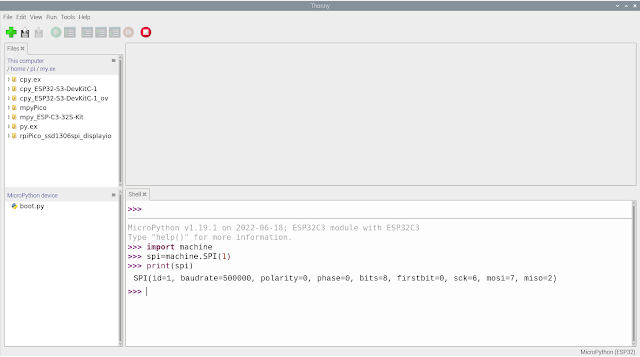
To list the default SPI pins in MicroPython: >>> import machine >>> spi=machine.SPI(1) >>> print(spi) SPI(id=1, baudrate=500000, polarity=0, phase=0, bits=8, firstbit=0, sck=6, mosi=7, miso=2) >>> Tested on ESP32C3:

ESP32-C3 (arduino-esp32) display on ST7735 SPI TFT using Adafruit ST7735 and ST7789 Library

Image
This video show how  Espressif ESP32-C3-DevKitM-1 (arduino-esp32) display on 1.8" 128x160 ST7735 SPI TFT , using Adafruit ST7735 and ST7789 Library. Install Library In Arduino IDE, open Library Manager to install "Adafruit ST7735 and ST7789 Library by Adafruit" and other library dependencies. Connection ST7735 SPI         ESP32-C3-DevKitM-1 ------------------------------ VCC           3V3 GND GND CS 10 RESET 9 A0           8 SDA 6 SCK 4 LED 3V3 Run Example Open and run Examples > Adafruit ST7735 and ST7789 Library > graphicstest

Drive ST7796 SPI TFT with XPT2046 Touch on ESP32-C3-DevKitM-1 (arduino-esp32), using TFT_eSPI.

Image
This video show how to drive 4 inch 480x320 SPI TFT ST7796 with XPT2046 Touch on ESP32-C3-DevKitM-1 (arduino-esp32) using TFT_eSPI. Include prepare user setup file and touch calibration. TFT_eSPI can be installed using Arduino IDE Library Manager. Check the GitHub page of TFT_eSPI , it's Arduino and PlatformIO IDE compatible TFT library optimised for the Raspberry Pi Pico (RP2040), STM32, ESP8266 and ESP32 that supports different driver chips. It's strongly recommended to follow the steps in Tips section in TFT_eSPI page: If you load a new copy of TFT_eSPI then it will overwrite your setups if they are kept within the TFT_eSPI folder. One way around this is to create a new folder in your Arduino library folder called "TFT_eSPI_Setups". You then place your custom setup.h files in there. After an upgrade simply edit the User_Setup_Select.h file to point to your custom setup file. Connection between ST7796 SPI ...

my dev.board - Espressif ESP32-C3-DevKitM-1

Image
ESP32-C3-DevKitM-1 is an entry-level development board based on ESP32-C3-MINI-1, a module named for its small size. This board integrates complete Wi-Fi and Bluetooth LE functions. pin assignment: doc: ~  ESP32-C3-DevKitM-1 User Guide related: ~ To develop in Arduino Framework,  Install ESP32 Arduino Core (arduino-esp32) on Arduino IDE . ~  Drive ST7796 SPI TFT with XPT2046 Touch on ESP32-C3-DevKitM-1 (arduino-esp32), using TFT_eSPI . MicroPython related: ~  MicroPython bluetooth example using aioble library, between Raspberry Pi Pico W and ESP32-C3. (Both run MicroPython 1.21.0) ~  MicroPython bluetooth remote control LED between Raspberry Pi Pico W and ESP32-C3, using aioble library . ~  BLE communication between MicroPython aioble and ArduinoBLE ESP-IDF: ~  Install Espressif IDF Extension in VS Code to program ESP32-C3 Run on Linux Mint 21.2 (over Windows 11/VirtualBox) . Embedded Rust: ~  Install Embedde...