Posts

Showing posts with the label Ubuntu MATE

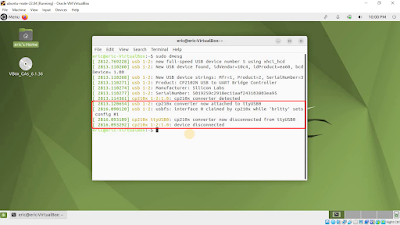
cp210x converter now disconnected from ttyUSB0 by 'brltty', on Ubuntu MATE 22.04 LTS.
Image
Recently, I install CircuitPython on ESP32-S3-DevKitC-1 on Ubuntu MATE 22.04 LTS/VirtualBox . But the CP2102N USB to UART Bridge Controller always attached and disconnected, like this: It's found that the interface 0 claimed by cp210x while 'brltty' sets config. BRLTTY is a background process (daemon) which provides access to the Linux/Unix console (when in text mode) for a blind person using a refreshable braille display. It drives the braille display, and provides complete screen review functionality. Some speech capability has also been incorporated. In my own case , I think brltty is not needed, so I remove it with command: sudo apt remove brltty It work for me, ttyUSB0 can be connected normally after brltty removed.

Install geany on Ubuntu MATE

Image
Geany is a lightweight programmer's text editor . To install geany on Ubuntu MATE, enter the command in Terminal: sudo apt install geany

Install Arduino IDE 1.8.19 on Ubuntu MATE 22.04 LTS, and set permission.

Image
This video show steps to install Arduino IDE 1.8.19 on Ubuntu MATE 22.04 LTS, and set permission for USB. Visit https://www.arduino.cc/en/software to download Arduino IDE 1.18.19, Linux 64 bits. Extract the downloaded file and run install.sh in terminal: sudo ./install.sh Normally, it will fail to upload due to permission denied. To fix it, enter the commands: sudo usermod -a -G dialout <user> sudo chmod a+rw <port> The Ubuntu MATE is installed over VirtualBox in last post , the video also show how to forward USB to virtual machine by adding to USB Device Filters. related: ~  Setup and post install Arduino IDE for Nano RP2040 Connect, on Ubuntu MATE ~  Check if I belongs to dialout group

Install Ubuntu MATE 22.04 LTS on VirtualBox 6.1

Image
Visit https://ubuntu-mate.org/download/ to download 64-bit PCs/Macs 22.04 LTS. It's strongly recpmmended to install Guest Additions CD image, as shown in the video.