Posts

Showing posts with the label display SSD1681 SPI e-paper

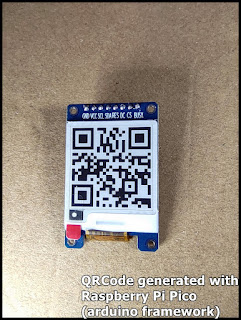
Generate QRCode with Raspberry Pi Pico (arduino framework), display on 1.54" 200x200 B&W e-Paper (SSD1681)
Image
Last post show how to  display on 1.54" 200x200 e-Paper (SSD1681) with Raspberry Pi Pico using GxEPD2 library, in Arduino framework . It's another exercise to generate QRCode with Raspberry Pi Pico, and display on 1.54" 200x200 B&W e-Paper (SSD1681) GxEPD2 and QRCode libraries are needed, install them in Arduino IDE's Library Manager. Code Pico_GxEPD2_SSD1681_qrcode.ino /* *Exercise run on Raspberry Pi Pico/RP2040 *display QRCode on 1.54" 200x200 e-Paper with SSD1681 SPI driver, *using ZinggJM/GxEPD2 and qrcode lib * *qrcode: *https://github.com/ricmoo/qrcode/ */ #include <GxEPD2_BW.h> #include <qrcode.h> #define EPD_CS 17 #define EPD_DC 21 #define SRAM_CS -1 #define EPD_RESET 20 #define EPD_BUSY 22 GxEPD2_BW<GxEPD2_154_GDEY0154D67, GxEPD2_154_GDEY0154D67::HEIGHT> display( GxEPD2_154_GDEY0154D67(EPD_CS, EPD_DC, EPD_RESET, EPD_BUSY)); const int DISP_WIDTH = display.width(); const int D...

Display on 1.54" 200x200 e-Paper (SSD1681) with Raspberry Pi Pico using GxEPD2 library, in Arduino framework.

Image
To display on 1.54" 200x200 e-Paper (SSD1681 SPI) with Raspberry Pi Pico using GxEPD2 library, in Arduino framework. GxEPD2 library is needed, it can be installed in Arduino IDE Library Manager. Connection between Raspberry Pi Pico and SSD1681 SSD1681 e-Paper Raspberry Pi Pico ================================= BUSY 22 CS 17 DC 21 RES 20 SDA 19 (MOSI) SCL 18 (SCK) VCC 3V3 GND GND Code: Pico_GxEPD2_SSD1681_hello.ino, display text. /* *Exercise run on Raspberry Pi Pico/RP2040 *display on 1.54" 200x200 e-Paper with SSD1681 SPI driver, *using ZinggJM/GxEPD2 lib. * */ #include <GxEPD2_BW.h> #include <Fonts/FreeMonoBold9pt7b.h> #include <Fonts/FreeMono9pt7b.h> #define EPD_CS 17 #define EPD_DC 21 #define SRAM_CS -1 #define EPD_RESET 20 #define EPD_BUSY 22 GxEPD2_BW<GxEPD2_154_GDEY0154D67, GxEPD2_154_GDEY0154D67::HEIGHT> display( GxEPD2_154_GDEY0154D67(EPD_CS, EPD_DC, EPD_RESET, EPD_BUSY)); void setup()...

1.54" 200x200 e-Paper with SSD1681 SPI driver

Image
It's 1.54" 200x200 e-Paper with SSD1681 SPI driver, by ZhongJing Yuan Electron. Exercise: ~  Display on 1.54" 200x200 e-Paper (SSD1681) with Raspberry Pi Pico using GxEPD2 library, in Arduino framework . ~  Generate QRCode with Raspberry Pi Pico (arduino framework), display on 1.54" 200x200 B&W e-Paper (SSD1681)