Posts

Showing posts with the label RISC-V

Hello CH32V307, flash & run GPIO_Toggle example on CH32V307V_EVT-R1, to blink LED and monitor USART.

Image
This video show how to flash & run GPIO_Toggle example on WCH CH32V307V_EVT-R1 using MounRiver Studio, to blink LED and monitor USART. Prepare CH32V307EVT evaluation board manual and reference routines Visit: https://www.wch.cn/products/CH32V307.html to download CH32V307评估板说明及参考应用例程 (CH32V307EVT evaluation board manual and reference routines): CH32V307EVT.ZIP Open GPIO_Toggle.wvproj with MounRiver Studio (under \CH32V307EVT\EVT\EXAM\GPIO\GPIO_Toggle folder), this example toggle PA0 and print something on USART. Connect USB to CH32V307V_EVT-R1: It's a built-in WCH-LinkE (same function as this one ) on CH32V307V_EVT-R1, used for online debugging and downloading of WCH RISC-V MCU, and also for online debugging and downloading of ARM MCU with SWD/JTAG interface. Connect USB to the USB port on the onboard WCH_LinkE of CH32V307V_EVT-R1. Configure WCH_LinkE: In MounRiver Studio, > Flash > Configuration. You can switch WCH_LinkE...

Dev. Board: CH32V307V_EVT-R1

Image
CH32V307V_EVT-R1 : CH32V307V (32-bit RISC-V MCU) evaluation board, by WCH Nanjing Qinheng Microelectronics Co., Ltd . Related link: ~  32-bit Interconnectivity RISC-V MCU – CH32V307 (English) ~ Currently,  CH32V307EVT evaluation board manual and reference routines: CH32V307EVT.ZIP is available in Chinese version only:  互联型RISC-V单片机 CH32V307 . Related: ~  Hello CH32V307, flash & run GPIO_Toggle example on CH32V307V_EVT-R1, to blink LED and monitor USART .

Install arduino_core_ch32 (1.0.3) on Arduino IDE 2+ to develop CH32V003 RISC-V MCU in Arduino Framework

Image
With openwch/arduino_core_ch32 , now we can develop  CH32 RISC-V MCU in Arduino IDE 2.0+/Windows 11. This video show steps to install arduino_core_ch32 in Arduino IDE 2 (fail to install version 1.0.4, then success in version 1.0.3). Then program  Muse Lab nanoCH32V003 (32-bit RISC-V development board) , and upload using  Muse Lab WCH-LinkE (WCH-Link Emulation Debugger Module) . Install arduino_core_ch32 in Arduino IDE 2 Add the following link in the "Additional Boards Managers URLs" field: https://github.com/openwch/board_manager_files/raw/main/package_ch32v_index.json Then search and install CH32 MCU EVT Boards by WCH. Currently, 1.0.4 is the most updated version, but fail: Downloading packages WCH:riscv-none-embed-gcc@8.2.0 WCH:openocd@1.0.0 WCH:beforeinstall@1.0.0 WCH:ch32v@1.0.4 Installing WCH:riscv-none-embed-gcc@8.2.0 Configuring tool. WCH:riscv-none-embed-gcc@8.2.0 installed Installing WCH:openocd@1.0.0 Configuring tool. ...

CH32V003 UART example

Image
It's a UART example run on Muse Lab nanoCH32V003 . Actually, it is the default Hello World generated by MounStudio Studio. It demonstrates that USART1 receives the data sent by CH341 and inverts it and sends it (baud rate 115200). This video also show the  Muse Lab WCH-LinkE act as USB to TTL serial adapter to communicate with CH32V003 via UART using RuTTY . Connection The modified main.c is listed here for reference. /********************************** (C) COPYRIGHT ******************************* * File Name : main.c * Author : WCH * Version : V1.0.0 * Date : 2022/08/08 * Description : Main program body. ********************************************************************************* * Copyright (c) 2021 Nanjing Qinheng Microelectronics Co., Ltd. * Attention: This software (modified or not) and binary are used for * microcontroller manufactured by Nanjing Qinheng Microelectronics. *********************...

Program CH32V003 with WCH-LinkE using MounRiver Studio on Windows 11

Image
This video show steps to install MounRiver Studio on Windows 11, include USB driver. Create and build project in MounRiver Studio. And download program to nanoCH32V003 with WCH-LinkE . Connection between nanoCH32V003 and WCH-LinkE CH32V003      WCH-LinkE --------------------- 3V3      3V3 DIO      SWDIO GND      GND Download, install and run MounStudio for Windows http://www.mounriver.com/download . It will update USB driver automatically. WCH-LinkE can be used to program RISV-V and ARM. To program CH32V003, it has to be set to WCH-LinkRV mode. To query and set Target Mode between WCH-LinkRV and WCH-DAPLink: Click on Download button on top menu bar > Configuration, follow the steps in the video. - In WCH-LinkRV mode (for RISC-V)   BLUE LED is off - In WCH-DAPLink mode (for ARM)   BLUE LED is on If it's error of: Read-Protect currently enabled...

Muse Lab WCH-LinkE

Image
It,s Muse Lab version of WCH-LinkE . related: ~  Program CH32V003 with WCH-LinkE using MounRiver Studio on Windows 11 ~  CH32V003 UART example (also show that WCH-LinkE can be used as USB to TTL serial adapter) ~  Install Core library for CH32duino (1.0.3) on Arduino IDE 2 to develop CH32 RISC-V MCU in Arduino Framework

nanoCH32V003: 32-bit RISC-V dev. board

Image
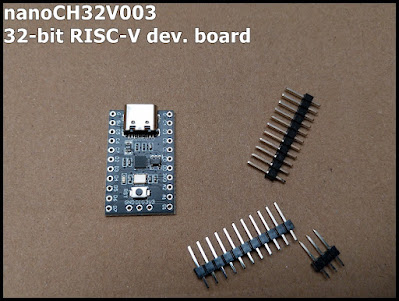
nanoCH32V003 , a very cheap 32-bit RISC-V development board made by MuseLab based on WCH CH32V003F4U6, cost me RMB ¥6.8 only. related links: ~ Github: wuxx/nanoCH32V003 ~ WCH: 32-bit general-purpose RISC-V MCU-CH32V003 Related post: ~  Program CH32V003 with WCH-LinkE using MounRiver Studio on Windows 11 ~  CH32V003 UART example In Arduino Framework: ~  Install Core library for CH32duino (1.0.3) on Arduino IDE 2 to develop CH32 RISC-V MCU in Arduino Framework

WCHlink Debugger for ARM/RISC-V, by WeAct Studio.

Image
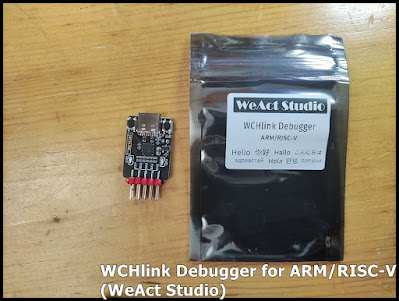
WCHlink Debugger for ARM/RISC-V, by WeAct Studio. ~ Steps to download firmware on CH582F (RISC-V) using WeAct WCHlink Debugger Related link: ~  gitee Wchlink (https://gitee.com/WeAct-TC/wchlink)

CH582F (RISC-V) BLE5.3 Core Board, by WeAct Studio.

Image
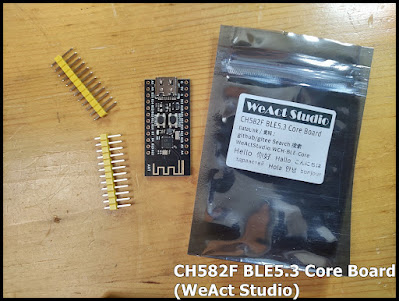
Its' CH582F BLE5.3 Core Board, by WeAct Studio. Related Link: ~ Product Page ~ Github WeActStudio.WCH-BLE-Core Remark in my start-up using CH582F BLE5.3 Core Board + WCHlink Debugger for ARM/RISC-V , by WeAct Studio. (on Windows 10) Install MounRiver & WCHISPTool (and driver) Download and install MounRiver Studio to build first Hello World. Firstly, I build a Hello World using MounRiver Studio and try to download to CH582F using ISP (In-System Programmer). At most beginning, I download and install  WCHISPTool_Setup.exe from Github , it's version 3.3. Suppose it will install WCHlink USB driver also. To put the CH582F in ISP mode, press and hold the BOOT button and connect to USB port. In my case, CH582F cannot be recognized. Then I download and re-install from WCH page (http://www.wch-ic.com/downloads/WCHISPTool_Setup_exe.html) . It's named  WCHISPStudio 3.4 now. Then it can be recognized, and everythin...