Posts

Showing posts with the label Raspberry Pi Camera Module 3 Wide NoIR

Python 3/PyQt5 + picamera2 on Raspberry Pi, list available cameras.

Image
In previous exercises of Python/PyQt5 GUI to control Raspberry Pi Camera using picamera2 lib , with camera_controls and White Balance , camera is assigned manually in Python code or command line argument. In this exercise (picam2_qt5_global.py), number of cameras attached and cameras info are retrieved by calling Picamera2.global_camera_info(), then run picam2_qt5_.py base on user selection. Code: picam2_qt5_global.py """ Python 3/PyQt5 + picamera2 List available cameras. Run picam2_qt5_.py base on user selection. """ from PyQt5.QtWidgets import (QComboBox, QMainWindow, QApplication, QWidget, QVBoxLayout, QLabel, QLineEdit, QPushButton) from PyQt5.QtCore import QProcess import sys from picamera2 import Picamera2 cameras_info = Picamera2.global_camera_info() num_of_cam = len(cameras_info) if num_of_cam == 0: print("No camera attached! Exit") exit(1) print("number of cameras: ...

How much current drawn by Raspberry Pi Camera Module 3?

Image
It's a roughly test on Raspberry Pi 5/64-bit Raspberry Pi OS (bookworm) with Camera Module 3 (NoIR Wide and normal) .

Using the Raspberry Pi Camera in Python3/PyQt5 applications using picamera2 lib

Image
Exercise to use the Raspberry Pi Camera in Python3/PyQt5 applications using picamera2 lib, with modification to make the preview match with captured images and enable Auto-Focus in Continuous. Tested on Raspberry Pi 5 running 64-bit Raspberry Pi OS (bookworm) with Camera Module 3. Please notice that currently only the Camera Module 3 provide Auto-Focus feature. Firstly, Copy from the example in The Raspberry Pi official manual The Picamera2 Library (2023-11-27) Charpter 8.5 Using the camera in Qt applications, named Qt_Picamera2_App.py. Qt_Picamera2_App.py listed here for reference. """ Copy from the example in The Raspberry Pi official manual The Picamera2 Library (2023-11-27) Charpter 8.5 Using the camera in Qt applications """ from PyQt5 import QtWidgets from PyQt5.QtWidgets import QPushButton, QVBoxLayout, QApplication, QWidget from picamera2.previews.qt import QGlPicamera2 from picamera2 import Picamera2 picam2 = Pic...

Python/picamera2 to read camera properties

Image
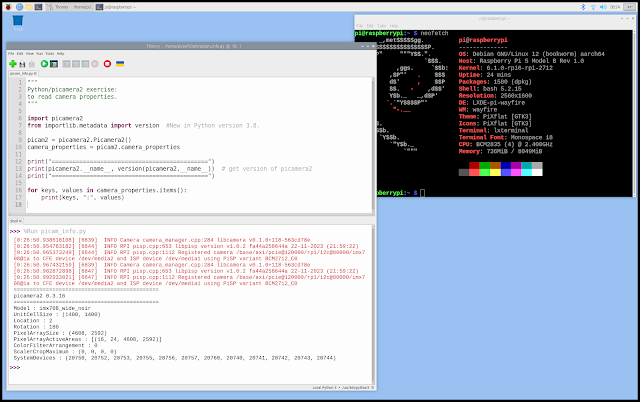
Python/picamera2 to read camera properties. picam_info.py """ Python/picamera2 exercise: to read camera properties. """ import picamera2 from importlib.metadata import version #New in Python version 3.8. picam2 = picamera2.Picamera2() camera_properties = picam2.camera_properties print("=============================================") print(picamera2.__name__, version(picamera2.__name__)) # get version of picamera2 print("=============================================") for keys, values in camera_properties.items(): print(keys, ":", values) Output run on Raspberry Pi 5/8G & Camera Module 3 Wide NoIR : ============================================= picamera2 0.3.16 ============================================= Model : imx708_wide_noir UnitCellSize : (1400, 1400) Location : 2 Rotation : 180 PixelArraySize : (4608, 2592) PixelArrayActiveAreas : [(16, 24, 4608, 2592)] ColorFilterArrangement : 0 ScalerCropMaximum : ...

My Raspberry Pi 5/8G and Camera Modules

Image
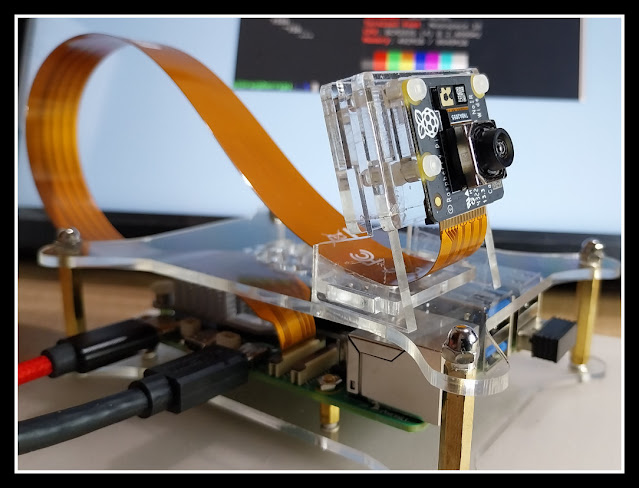
My Raspberry Pi 5/8G & Camera Module 3 Wide NoIR Raspberry Pi 5 with dual camera, Camera Module 3 & HQ Camera. Official document: ~ The Picamera2 Library (picamera2-manual.pdf) updated at 2023-11-27. ~ Raspberry Pi Camera Algorithm and Tuning Guide (raspberry-pi-camera-guide.pdf) updated at 2023-11-27. Python code to read sys info: ~ check memory and disk info using psutil ~ read model name ~ Python code to check if Raspberry OS are Running in 32-bit or 64-bit Exercises run on Raspberry Pi 5 running 64-bit Raspberry Pi OS (bookworm) with Camera Module 3: ~ Python/picamera2 to read camera properties ~  Using the Raspberry Pi Camera in Python3/PyQt5 applications using picamera2 lib ~  Python/PyQt5 GUI to control Raspberry Pi Camera using picamera2 lib , with Camera Module 3/HQ Camera. ~  Python/PyQt5/Picamera2 to control Raspberry Pi Cameras with GUI, with camera_controls . ~  Python/PyQt5/Picamera2 to cont...