Posts

Showing posts with the label Nologo Nano 33 BLE nRF52840

Display on 320x480 ILI9488 SPI TFT with Nano 33 BLE nRF52840 using Arduino_GFX Library (Arduino framework)

Image
This video show steps to display on 3.5" 320x480 ILI9488 SPI TFT with Nologo Nano 33 BLE nRF52840 using Arduino_GFX Library (Arduino framework). Makesure "GFX Library for Arduino" is installed in Arduino IDE Library Manager. Open Examples > GFX Library for Arduino > HelloWorldGfxfont Replace the code of Arduino_GFX setting, /******************************************************************************* * Start of Arduino_GFX setting ******************************************************************************/ #include <Arduino_GFX_Library.h> #define TFT_CS D10 #define TFT_RESET D9 #define TFT_DC D8 #define TFT_MOSI D11 #define TFT_SCK D13 #define TFT_LED D7 #define TFT_MISO -1 // not used for TFT #define GFX_BL TFT_LED // backlight pin /* More data bus class: https://github.com/moononournation/Arduino_GFX/wiki/Data-Bus-Class */ Arduino_DataBus *bus = new Arduino_HWSPI(TFT_DC, TFT_CS); /* More display c...

BLE communication between MicroPython aioble and ArduinoBLE

Image
Previous posts introduced " MicroPython bluetooth remote control LED between Raspberry Pi Pico W and ESP32-C3, using aioble library " and " BLE examples run on Nano 33 BLE (as Peripheral) and Uno R4 WiFi (as Central) using ArduinoBLE in Arduino Framework ". This video further test how BLE communication between that two approach.

Display on SSD1306/SSD1315 OLED with Uno R4 WiFi & Nano 33 BLE using Adafruit SSD1306 library

Image
Last post show how to display on SSD1306/SSD1315 OLED with Uno R4 WiFi & Nano 33 BLE using U8g2 library , this post show how to using Adafruit SSD1306 library. Install Adafruit SSD1306 library and dependencies, Adafruit BusIO and Adafruit GFX Library. Connnection, refer to last post . In last post, it's found that the I2C Address of SSD1306/SSD1315 OLED is 0x3C. Open File > Examples > Adafruit SSD1306 > ssd1306_128x64_i2c Change SCREEN_ADDRESS to 0x3C. #define SCREEN_ADDRESS 0x3C //0x3D Then it can run on Uno R4 WiFi & Nano 33 BLE to display on SSD1306/SSD1315 OLED.

Display on SSD1306/SSD1315 OLED with Uno R4 WiFi & Nano 33 BLE using U8g2 library

Image
This video show displaying on 0.96 inch 128x64 SSD1306/SSD1315 OLED with NoLogo Uno R4 WiFi & Nologo Nano 33 BLE nRF52840 using U8g2 library . Library: Install U8g2 Library in Arduino IDE's Library Manager. Connection: Connection between SSD1306/SSD1315 OLED and Uno R4 WiFi/Nano 33 BLE notice: Uno R4 WiFi operate on 5V Nano 33 BLE operate on 3.3V The operating voltage of my OLED board is 3.3~5V * Check operating voltage of your own OLED board! OLED Uno R4 WiFi Nano 33 BL ------------------------------ GND GND GND VCC +5V +3V3 SCL D19/SCL A5/P0.02 SDA D18/SDA A4/P0.31 Arduino Code: i2c_scanner.ino , scan connected I2C devices and print its I2C address. #include <Wire.h> void setup() { Wire.begin(); delay(1000); Serial.begin(115200); while (!Serial); delay(1000); Serial.println("\nI2C Scanner"); delay(2000); } void loop() { byte error, address; int nDevices; Serial.println(...

Install MicroPython on Nologo Nano 33 BLE nRF52840

Image
This video show steps to install MicroPython on Nologo Nano 33 BLE nRF52840 manually, basically follow the  MicroPython with Arduino page . Notice that to update bootloader and install the Soft Device, you have to make sure Arduino Mbed OS Nano Boards is installed in Board Manager. And select Board of Arduino Mbed OS Nano Boards > Arduino Nano 33 BLE. With MicroPython firmware flashed, you can download and install  Arduino Lab for MicroPython . Arduino Lab for MicroPython is a lightweight editor for MicroPython programs, supporting connection with a board, code upload, file transfer, interactive REPL shell. You can resume Arduino after MicroPython flashed.

Control 3.2" 240x320h IPS SPI Module ILI9341 with cap. touch FT6336U on Nologo Nano 33 BLE (Arduino Framework)

Image
In this post, to Control 3.2" 240x320h IPS SPI Module ILI9341 with cap. touch FT6336U with Nologo Nano 33 BLE in Arduino Framework, Adafruit_ILI9341 and Arduino-FT6336U libraries are need. - To install Adafruit_ILI9341, read the video in Raspberry Pi Pico (RP2040) + 3.2inch IPS SPI Module ILI9341 . - To download and install Arduino-FT6336U, read the video in Detect FT6336U Capacitive Touch Screen on Raspberry Pi Pico using Arduino-FT6336U library . Connection ILI9341 Module      Nano 33 BLE 1 VCC      3V3 2 GND             GND 3 LCD_CS      D5 4 LCD_RST      D6 5 LCD_RS      D7 6 SDI(MOSI)    D11 (SPI COPI) 7 SCK      D13 (SPI SCK) 8 LED      3V3 9 SDO(MISO)    D12 (SPI CIPO) 10 CTP_SCL      A5 (I2C SCL) 11 CTP_RST      D8 12 CTP_SDA     ...

Control Nologo Nano 33 BLE nRF52840 on-board LEDs

Image
Arduino code to control Nologo Nano 33 BLE nRF52840 on-board LEDs /* Exercise run on Nano 33 BLE nRF52840 to change LEDs. */ // the setup function runs once when you press reset or power the board void setup() { delay(1000); Serial.begin(9600); delay(500); Serial.print("LED_BUILTIN: "); Serial.println(LED_BUILTIN); Serial.print("LEDR: "); Serial.println(LEDR); Serial.print("LEDG: "); Serial.println(LEDG); Serial.print("LEDB: "); Serial.println(LEDB); // set LED pins to output mode pinMode(LEDR, OUTPUT); pinMode(LEDG, OUTPUT); pinMode(LEDB, OUTPUT); pinMode(LED_BUILTIN, OUTPUT); //turn off all LED digitalWrite(LED_BUILTIN, LOW); digitalWrite(LEDR, HIGH); digitalWrite(LEDG, HIGH); digitalWrite(LEDB, HIGH); } void changeRGB(){ digitalWrite(LEDR, HIGH); digitalWrite(LEDG, HIGH); digitalWrite(LEDB, HIGH); delay(1000); digitalWrite(LEDR, LOW); //LEDR On delay(500); digit...

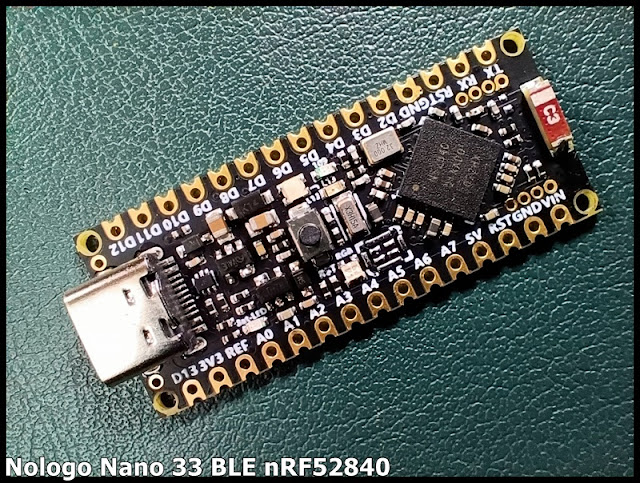
my dev.board - Nologo Nano 33 BLE nRF52840

Image
Nologo Nano 33 BLE nRF52840 Pinout: ref: ~ Arduino Nano 33 BLE Document Install and first try Nologo Nano 33 BLE nRF52840 in Arduino IDE 2 To program Nologo Nano 33 BLE nRF52840 in Arduino framework, makesure Arduino Mbed OS Nano Boards is installed in Board Manager. And select Board of Arduino Mbed OS Nano Boards > Arduino Nano 33 BLE. Exercise: Arduino Framework: ~  Control Nologo Nano 33 BLE nRF52840 on-board LEDs ~  Control 3.2" 240x320h IPS SPI Module ILI9341 with cap. touch FT6336U on Nologo Nano 33 BLE (Arduino Framework) ~  BLE examples run on Nano 33 BLE (as Peripheral) and Uno R4 WiFi (as Central) ~  BLE communication between MicroPython aioble and ArduinoBLE ~  Display on SSD1306/SSD1315 OLED with Uno R4 WiFi & Nano 33 BLE using U8g2 library ~  Display on SSD1306/SSD1315 OLED with Uno R4 WiFi & Nano 33 BLE using Adafruit SSD1306 library ~  Display on 320x480 ILI9488 SPI TFT wit...